
How to Write ERP Requirements: A Singapore SME Guide (With AI and Approval Rules)
Most ERP quotes go wrong before anyone writes a line of code. A business sends three vendors a one-paragraph brief ("we need inventory, sales and accounting"), gets back three proposals that cannot be compared, and picks on price or on whoever demoed best. Six months later the project is arguing about things that were never written down: who approves a discount, what happens when stock goes negative, whether the system talks to the accounting software.
An ERP requirements document fixes that. It is a short, plain-language description of how your business actually runs, what the new system must do, and how you will judge whether it works. It lets every vendor quote against the same picture, and it becomes the reference point when scope questions come up later.
This guide is for owners, operations heads and finance managers at Singapore SMEs who are about to ask for ERP quotes, whether for packaged software, a custom build or a custom AI ERP. It covers what to put in the document, how to describe AI features and human approvals so they can actually be built, and what to leave out.
SectionWho this guide is for
You will get the most from this if:
- You are replacing spreadsheets, a legacy system or a patchwork of tools with one ERP.
- You plan to compare more than one vendor or approach.
- You want AI to take on part of the work (reading documents, drafting quotes, flagging exceptions) and need to describe that clearly.
- You do not have a full-time business analyst and need a format your own team can fill in.
If you have not yet decided whether to build or buy, read our build-versus-buy decision guide alongside this one. The requirements document is useful either way: it is the same input whether you end up configuring a package or commissioning a custom system.
SectionWhat an ERP requirements document is (and is not)
A good requirements document describes outcomes and rules, not screens. It says "a sales coordinator must be able to turn a customer RFQ into a priced quotation, and any line below the minimum margin needs the sales manager's approval". It does not say "add a blue button on the top right".
It is not:
- A feature wish list. Long lists of features ("multi-currency, barcode, dashboards, mobile") tell a vendor nothing about how you work, and every vendor will tick every box.
- A technical specification. Database design, hosting architecture and code structure are the vendor's job. You describe what the business needs; they propose how.
- A contract. It feeds the proposal and the statement of work, but the vendor's response is where commitments on scope, timeline and price should be written down.
Aim for something your team can read in half an hour. For most SMEs that is a working document of a few pages per business process, plus appendices with sample documents.
SectionThe structure we recommend
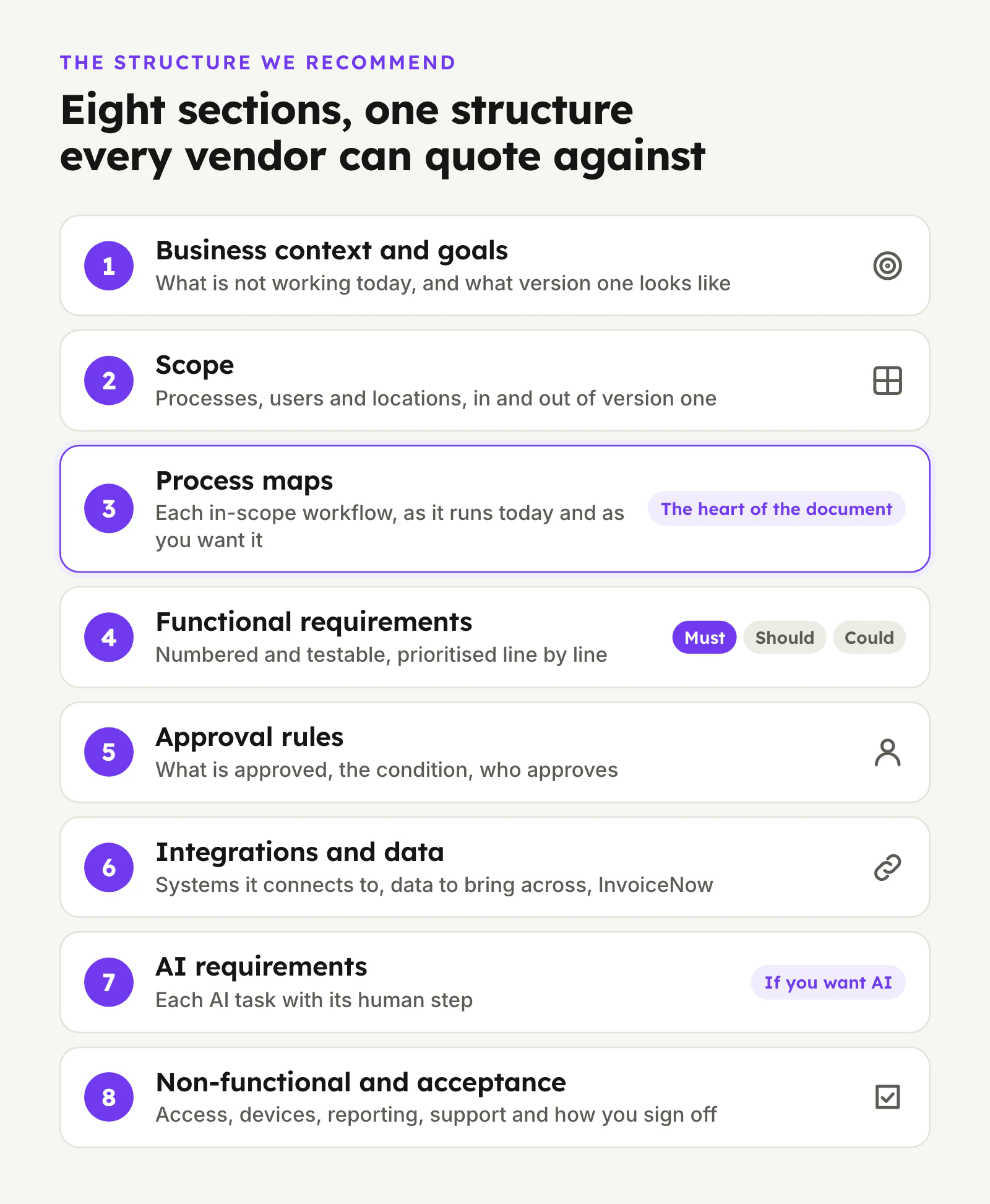
Use these eight sections. Each is explained below.
- Business context and goals
- Scope: processes, users and locations
- Process maps for each in-scope workflow
- Functional requirements, prioritised
- Approval rules and controls
- Integrations and data
- AI requirements (if you want AI in the system)
- Non-functional requirements and acceptance criteria
1. Business context and goals
Start with a few paragraphs any vendor can understand without a meeting:
- What the business does, who its customers are and how it sells (projects, repeat orders, walk-in, distributors).
- What is not working today, described as concretely as you can. "Quotations take too long because pricing lives in three spreadsheets" is far more useful than "we need efficiency".
- What a successful version one looks like. Pick two or three outcomes you can actually observe, such as "every order traceable from quote to invoice in one system" or "month-end no longer depends on re-keying sales data into accounting".
Only include measures you already track. If you do not know how long a quote takes today, say so and make "measure it during discovery" a requirement instead of guessing a figure.
2. Scope: processes, users and locations
List what is in and out of version one. Be explicit about exclusions; they prevent more disputes than inclusions do.
- Processes in scope, for example RFQ to quotation, sales order to delivery, purchase request to supplier invoice, stock receiving and transfers, month-end hand-off to accounting.
- Processes out of scope for now, for example payroll, HR or a customer portal.
- Users by role, with rough headcounts: sales, operations, warehouse, purchasing, finance, management. Note who works on a phone or tablet rather than a desktop.
- Entities and locations: more than one company, warehouse or currency, and any overseas operations.
3. Process maps for each in-scope workflow
This is the heart of the document. For every in-scope process, write the steps as they happen today and as you want them to happen.
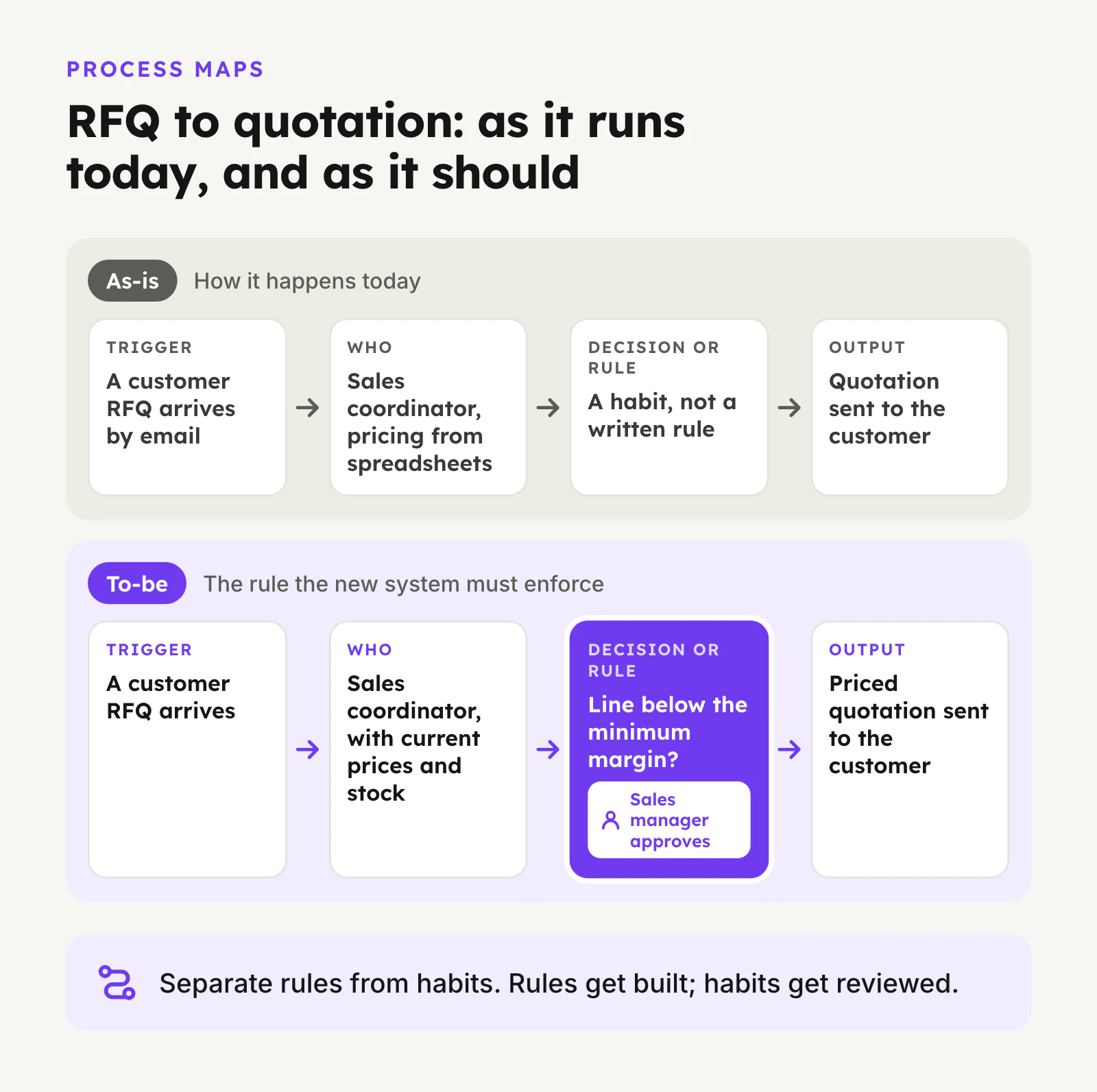
A simple format works well for each step:
- Trigger: what starts it (a customer email, a stock level, a date).
- Who does it: the role, not the person's name.
- What they need: information, documents, prices, stock levels.
- Decision or rule: anything that changes the path (credit limit exceeded, item not in stock, discount above threshold).
- Output: what is produced and where it goes next.
Two habits make process maps much more useful:
- Separate rules from habits. "We always call the customer before shipping" might be a rule (high-value orders need confirmation) or a habit nobody remembers starting. Mark which is which. Rules get built; habits get reviewed.
- Write down the exceptions. Partial deliveries, returns, back-orders, price changes after quotation, a supplier invoice that does not match the PO. These are where systems break and quotes diverge, so name them early.
Attach real (redacted) samples in an appendix: a typical quotation, purchase order, delivery order, invoice and the spreadsheet you use for pricing or stock. One real document explains more than a page of description.
4. Functional requirements, prioritised
Turn the process maps into a numbered list of requirements, each one testable. A useful pattern is:
SAL-04 A sales coordinator can create a quotation from a customer RFQ, pulling current item prices and stock availability. Priority: Must.
Number each requirement with a short prefix per process (SAL for sales, PUR for purchasing, INV for inventory, FIN for finance) so vendors can respond line by line and you can trace each one through testing.
Prioritise every line using three levels:
- Must: version one fails without it.
- Should: important, but a workaround exists for a few months.
- Could: nice to have; include only if it does not move cost or timeline.
Be strict with "Must". If everything is a Must, vendors will price everything, and you lose the ability to phase. Our ERP implementation checklist explains why a tight version one is one of the strongest predictors of a smooth go-live.
5. Approval rules and controls
Approval rules are usually scattered across people's heads, WhatsApp threads and email sign-offs. Write them down as a table: what is being approved, the condition, who approves, and what happens if they reject it or do not respond.
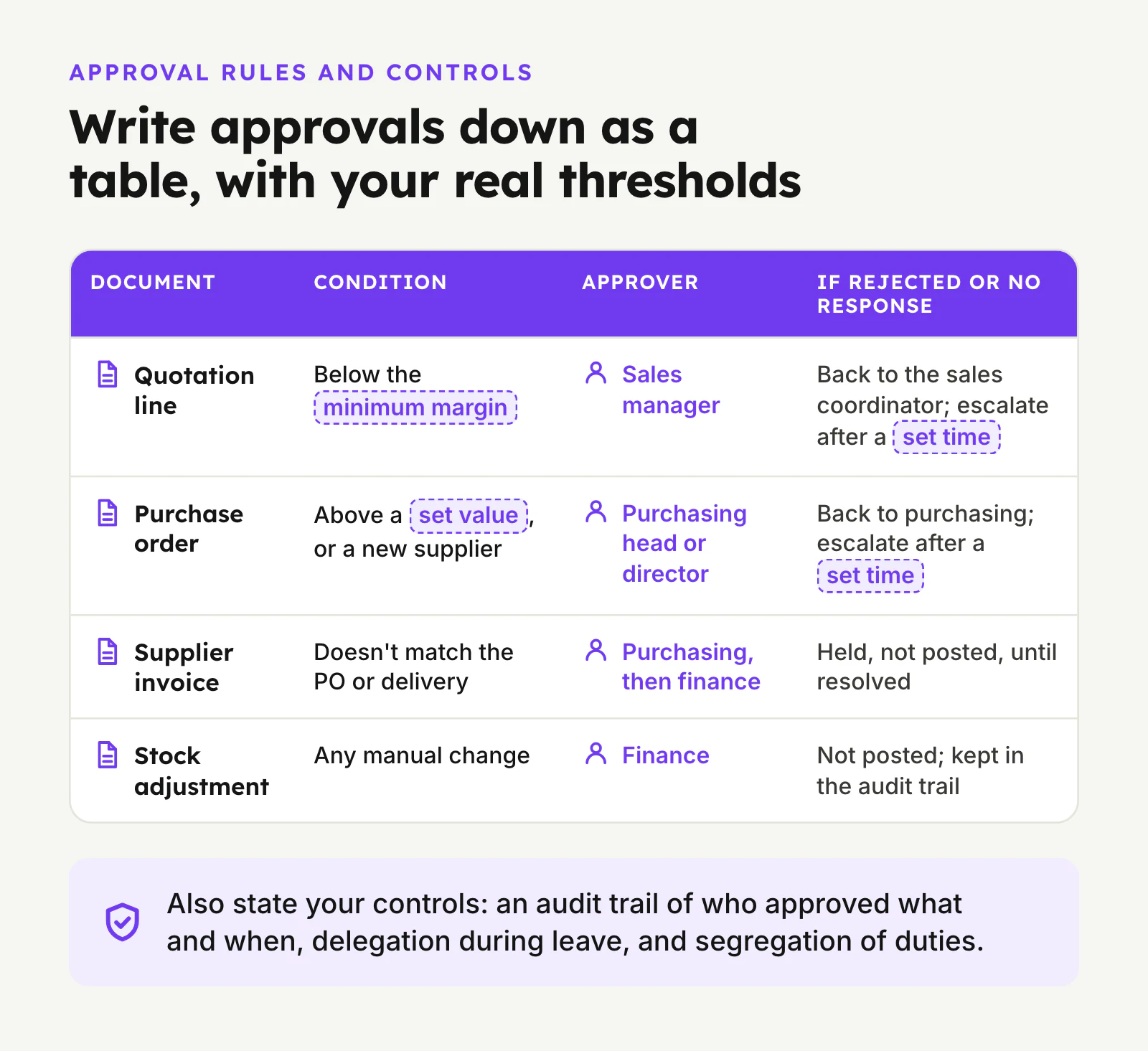
Typical rows for an SME:
- Quotation line below the minimum margin → sales manager.
- Purchase order above a set value, or from a new supplier → purchasing head or director.
- Supplier invoice that does not match the PO or delivery → purchasing, then finance.
- Credit note, write-off or manual stock adjustment → finance.
- Changes to customer credit limits or price lists → named owner only.
Leave the thresholds as your real numbers; do not let a vendor fill them in. Also state your control expectations: an audit trail of who approved what and when, the ability to delegate approval during leave, and segregation of duties where one person should not both raise and approve a payment-related document.
If AI will be drafting or checking any of these documents, this section is where you decide which steps a person must approve before anything is sent, posted or paid. We cover the design choices in more depth in our guide to human-in-the-loop AI approval.
6. Integrations and data
List every system the ERP must connect to and, for each, what moves in which direction and how often:
- Accounting software: for example, whether invoices and payments sync to it, or whether the ERP replaces it. See our notes on accounting software integration.
- E-commerce, marketplaces, POS or customer portals: orders in, stock levels out.
- Banks and payment gateways, if payments are reconciled in the ERP.
- Logistics partners, supplier portals or existing systems you are keeping.
- Email and messaging channels where orders or RFQs arrive today.
Singapore GST and InvoiceNow. If you are GST-registered, write this requirement down explicitly. IRAS is phasing in the GST InvoiceNow Requirement, under which GST-registered businesses submit invoice data to IRAS through an InvoiceNow-Ready Solution. It already applies to new voluntary GST registrants, and IRAS's published schedule extends it to all GST-registered businesses in phases through to April 2031. Check your own business's implementation date on the IRAS InvoiceNow page and ask every vendor how their solution will meet it, either directly or through your accounting system.
For data, list what you expect to bring across: customers, suppliers, items, price lists, open orders, stock balances, and how much history. You do not need a migration plan at this stage, but vendors need to know the size and messiness of what they are inheriting. Our ERP data migration guide covers what to move, what to archive and how to clean it.
Finally, state your personal data position: what personal data the system will hold (customer contacts, staff details) and that you expect the vendor to support your obligations under the PDPA, including access controls and where data is hosted.
7. AI requirements
"AI-powered" in a proposal means nothing unless your requirements say what the AI should do. Describe each AI capability the same way as any other requirement: the task, the input, the output, who reviews it and what counts as acceptable.
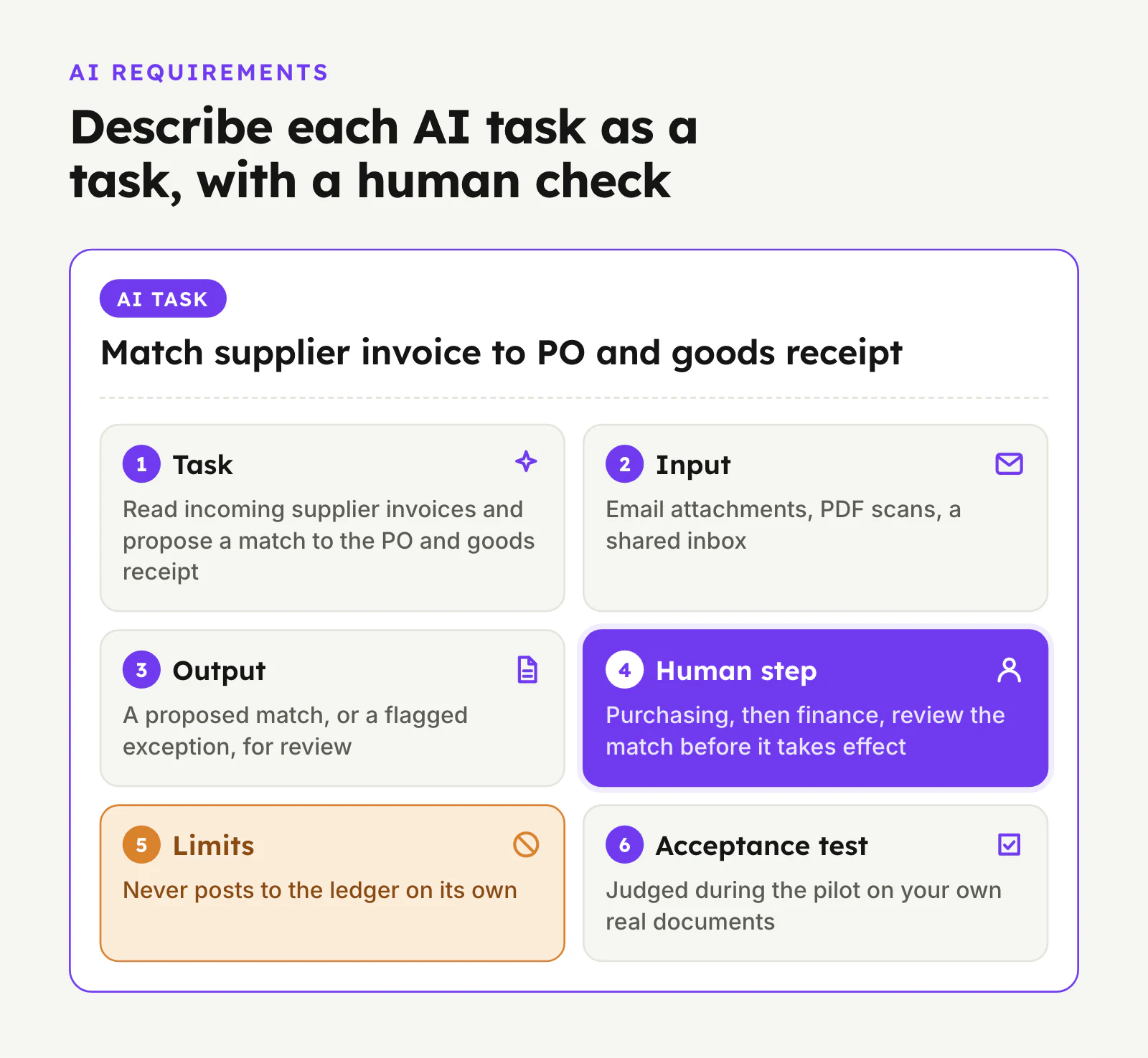
For each AI task, answer six questions:
- Task: what the AI does, in one sentence. Example: read incoming supplier invoices and propose a match to the PO and goods receipt.
- Input: where the information comes from (email attachments, PDF scans, a shared inbox, a WhatsApp number).
- Output: what it produces (a draft record, a suggested price, a flagged exception), and where that appears.
- Human step: who reviews or approves the output before it takes effect, and what they see when they do.
- Limits: what the AI must never do on its own, such as sending a quotation to a customer, posting to the ledger or changing a price list.
- Acceptance test: how you will judge it during the pilot, using your own real documents.
Good first candidates are repetitive, document-heavy steps with a clear human check: drafting quotations from RFQs, reading supplier invoices, matching purchase documents in procurement, or summarising exceptions for a manager. If you already have an ERP you want to keep, the same card works for scoping additions; see how to add AI to an existing ERP.
Also ask each vendor to state, in writing, which AI model providers they use, where prompts and documents are processed and stored, whether your data is used to train models, and how you can switch the AI features off if needed. Treat their answers as commitments to verify, not marketing.
8. Non-functional requirements and acceptance criteria
These are the requirements that are not about a specific process but still decide whether the system works for you:
- Access and roles: who can see costs, margins and salaries; whether staff log in with company accounts.
- Devices: which roles need a phone or tablet interface, and whether the warehouse needs barcode scanning or offline use.
- Reporting: the five or six reports management actually looks at today, with samples attached.
- Support and ownership: who owns the code, data and configuration; support hours; how changes are requested and priced after go-live.
- Acceptance criteria: how you will sign off each phase. The simplest version is that named users complete their real daily tasks end to end in a test environment, using migrated data, without falling back to spreadsheets.
SectionHow to use the document with vendors
Once the document is ready:
- Send the same document to every vendor, with your sample documents attached, and ask them to respond requirement by requirement: met as standard, met by configuration, needs custom work, or not supported.
- Ask for a walkthrough of your own process, not a generic demo. Give them one real RFQ or supplier invoice and ask them to show how it moves through their system, including the approval steps.
- Ask what they would cut from version one. A vendor who pushes back on your Must list with reasons is usually more useful than one who accepts everything.
- Compare proposals on the same terms: scope against your numbered requirements, phasing, who does the data work, integration approach, AI data handling, ownership and ongoing costs.
For a sense of what drives cost once you have proposals in hand, our AI ERP cost guide walks through the main factors.
SectionCommon mistakes
- Copying a template from the internet. Generic templates produce generic requirements. Use a structure, but fill it from your own process maps.
- Letting the vendor write your requirements. Discovery workshops with a vendor are useful, but if their output becomes your requirements, it will tend to describe their product. Write your own first, then refine it with them.
- Skipping the exceptions. The happy path is easy for everyone. Returns, partial deliveries and mismatched invoices are where projects slip.
- Describing AI as a feature, not a task. "AI dashboard" or "AI forecasting" cannot be tested. "Draft a quotation from an RFQ for the sales coordinator to approve" can.
- Leaving approvals implicit. If the document does not say who approves what, the system will either block everything or let everything through.
- Freezing nothing. Requirements will change, but agree a point where version one scope is frozen and further changes go through a simple change request.
SectionWhere SleekDigital fits
We build custom AI ERP systems for Singapore SMEs, with AI agents that do the first pass on repetitive work and people approving the decisions that matter. If you have a draft requirements document, or only a rough process map and a few sample documents, we can review it with you and turn it into a scoped first release. Start on our AI ERP page or get in touch.
SectionFAQ
How long should an ERP requirements document be?
Long enough to describe each in-scope process, its rules and its exceptions, and no longer. For most SMEs that is a few pages per process plus appendices with real sample documents. A short document built on accurate process maps is more useful than a long feature checklist.
Should we write requirements ourselves or hire a consultant?
Your own team should write the first draft, because they know how the business actually runs. An outside consultant or the shortlisted vendor can then help tighten it, spot gaps and phase it. The risk with handing the whole job to a vendor is that the requirements end up describing their product.
What is the difference between an ERP requirements document and an RFP?
The requirements document describes your business and what the system must do. A request for proposal (RFP) is the wider package you send vendors: the requirements document plus instructions on how to respond, your timeline, evaluation criteria and commercial questions. Write the requirements first; the RFP wraps around it.
How do we write requirements for AI features?
Describe each AI capability as a task: what it reads, what it produces, who reviews it, what it must never do on its own and how you will test it with your own documents. Avoid vague items like "AI insights" that cannot be accepted or rejected in a pilot.
Do we need to include InvoiceNow in our ERP requirements?
If you are GST-registered, yes. IRAS is phasing in the GST InvoiceNow Requirement for GST-registered businesses, with its published schedule running to April 2031. Check your own implementation date with IRAS and ask each vendor to explain how their solution submits invoice data, directly or through your accounting software.
Should approval thresholds go in the requirements document?
Yes. Write your actual approval rules as a table: what is approved, the condition, who approves, and what happens on rejection or no response. Vendors cannot design approval flows, or AI review steps, around rules they have not been given.
Can the same requirements document be used for packaged and custom ERP?
Yes. Because it describes outcomes and rules rather than screens, you can send it to a packaged ERP reseller and to a custom developer and compare their responses line by line. It is one of the clearest ways to see whether a package fits or a custom build is justified.
What should we do if we cannot describe a process clearly?
Mark it as unclear and make discovery of that process an explicit part of the first phase. An honest gap is better than an invented process, which tends to get built and then worked around.
Written by
Lester Law
Building custom software solutions for Singapore businesses. We help companies transform their operations with mobile apps, web platforms, and enterprise systems.