
ERP Data Migration in Singapore: A Practical Guide for SMEs
Most ERP projects that go wrong do not fail on software. They fail in the first week after go-live, when a salesperson quotes the wrong price because two customer records were merged badly, or the warehouse cannot find stock because item codes from three old spreadsheets never lined up.
Data migration is the unglamorous part of an ERP project, and it decides whether your team trusts the new system. It matters even more if the new system is an AI ERP: agents that draft quotations, purchase orders or invoice matches are only as good as the records they read. A messy item master does not just slow staff down; it makes an agent confidently wrong.
This guide is for Singapore SMEs moving off spreadsheets, an older accounting package, an in-house system, or an ERP that has outgrown the business. It covers what to migrate, how to clean it, how to rehearse, and where AI can genuinely help without taking decisions away from your people.
If you want the full project view (ownership, scope, pilot, training, hypercare), start with our ERP implementation checklist. This article goes deep on one stage of it: the data.
SectionWho this guide is for
- Distributors, wholesalers and manufacturers whose item, price and customer data lives across Excel, an accounting package and staff memory.
- Companies replacing an in-house system built years ago (see legacy system modernisation if the old software itself is the problem).
- Teams keeping SAP Business One, Xero or another system and adding AI to the existing ERP. You may not migrate everything, but the same cleaning work applies to the data the agents will read.
- Finance managers who need opening balances, open invoices and GST data to reconcile on day one.
SectionWhat "data migration" actually covers
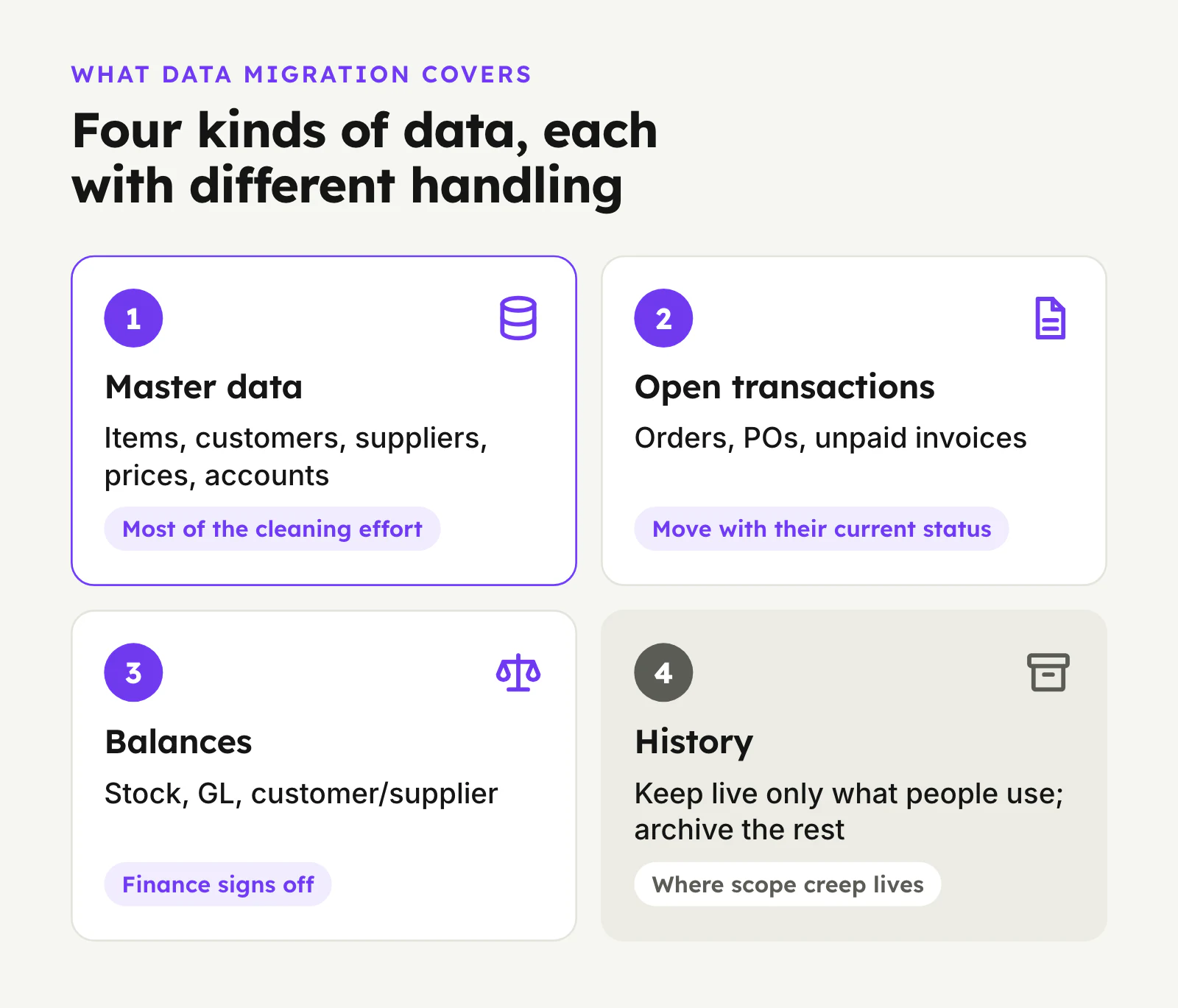
People often picture migration as a single export and import. In practice there are four different kinds of data, and each needs different handling.
1. Master data. The slow-changing records everything else refers to: items and SKUs, units of measure, bills of materials, customers, suppliers, price lists, payment terms, warehouses and bin locations, chart of accounts, tax codes, employees and approval roles. This is where most of the cleaning effort goes, because errors here repeat on every transaction.
2. Open transactions. Work that is in flight at cut-over: open sales orders and quotations, open purchase orders, goods received but not invoiced, unpaid customer invoices, unpaid supplier bills, open jobs or work orders. These must move with their current status so nobody loses track of a delivery or a payment.
3. Balances. Opening stock quantities and values by location, opening general ledger balances, customer and supplier balances (usually as open items rather than a single number), and bank balances. Finance signs these off.
4. History. Past orders, invoices and stock movements. This is where scope creep lives. Not all history needs to be live in the new ERP.
SectionDecide what not to migrate
The cheapest record to clean is the one you do not move. Before anyone touches a spreadsheet, agree a rule for each data type:
- Items: migrate active items and items with stock on hand or open documents. Mark obsolete items as inactive in the old system rather than carrying them across.
- Customers and suppliers: migrate accounts with recent activity, open balances or open documents. Dormant accounts can be added later if they come back.
- History: decide how much history people genuinely use. Sales staff often want each customer's past prices; finance needs prior-year figures for comparison. Detailed line-level history from many years ago is rarely opened.
History you do not migrate still has to be kept. IRAS requires businesses to keep business records, generally for five years, so the old data must stay accessible: as a read-only copy of the old system, a reporting database, or archived exports with a clear index. Agree where it lives and who can access it before you switch the old system off.
For an AI ERP, there is one nuance. Price history and past quotation lines are useful inputs for an agent that drafts quotes, even if staff rarely open them. You can keep that history in a separate, read-only store the agent can query, rather than loading every old document into the live ERP.
SectionClean before you migrate, not after
Cleaning data inside the new system after go-live is slower and riskier: transactions start referencing the bad records immediately. Clean in a staging copy before the first load.
Items and SKUs
- Duplicates. The same product under two codes, or the same code with two descriptions. Common when several people created items over the years.
- Descriptions. Free-text names like "SS bolt M8x30 (box)" vs "M8 x 30 stainless bolt". Agree a naming pattern (type, material, size, pack) and apply it.
- Units of measure. Items bought by the carton, stored by the box and sold by the piece need conversion factors defined once, correctly. Wrong conversions are one of the most common causes of stock that does not reconcile.
- Categories and attributes. Needed for reporting, reorder rules and for agents that match a customer's free-text request to your catalogue.
- Supplier part numbers and customer part numbers. If customers order using their own codes, capture the cross-reference. It is exactly what a quotation or sales order agent needs.
Customers and suppliers
- Merge duplicates (same company under a trading name and a registered name, or branches entered separately). Keep the UEN where you have it; it is the cleanest unique key for Singapore companies.
- Check billing vs delivery addresses, contacts and email addresses for invoices and statements.
- Confirm payment terms, credit limits and currencies.
- Flag GST registration status where it affects invoicing.
Customer contacts are personal data. Under the PDPA, migrate only what you need for the purpose it was collected for, limit who can see it in staging files, and delete working copies (spreadsheets on laptops, email attachments) once the migration is done.
Prices
Price data is usually the messiest. Look for customer-specific price lists, contract prices with expiry dates, volume breaks, and "special prices" that only exist in someone's head or email. Decide which are still valid. A quotation agent working from an outdated contract price is a commercial risk, which is why it should always hand a draft to a person for approval rather than send it.
Finance data
- Map the old chart of accounts to the new one. This is a good moment to simplify, but agree it with your accountant or auditor first.
- Map tax codes, including standard-rated, zero-rated and exempt supplies. The GST rate has been 9% since 1 January 2024; make sure historical documents keep the rate they were issued at.
- If you invoice through InvoiceNow (Peppol), or expect to as IRAS phases in requirements for GST-registered businesses, check that customer Peppol IDs and the new system's e-invoicing setup are part of the migration. Check IRAS's current guidance for the timeline that applies to you.
SectionMap fields and owners
For each data type, build a simple mapping sheet: old field, new field, transformation rule (for example "split full name into first and last", "convert carton to piece using factor"), default value if blank, and who owns the decision.
Ownership matters more than tools. Every data type needs one named person in the business who decides what is correct:
| Data | Typical owner |
|---|---|
| Items, units, BOMs | Operations or warehouse lead |
| Customers, prices, terms | Sales manager |
| Suppliers, purchase terms | Purchasing lead |
| Chart of accounts, balances, tax codes | Finance manager |
| Users, roles, approval limits | Business owner with finance |
The implementation team prepares the data; the owners sign it off. When nobody owns a decision, it gets made by whoever is doing the import, usually at night, under deadline.
SectionWhere AI genuinely helps with migration
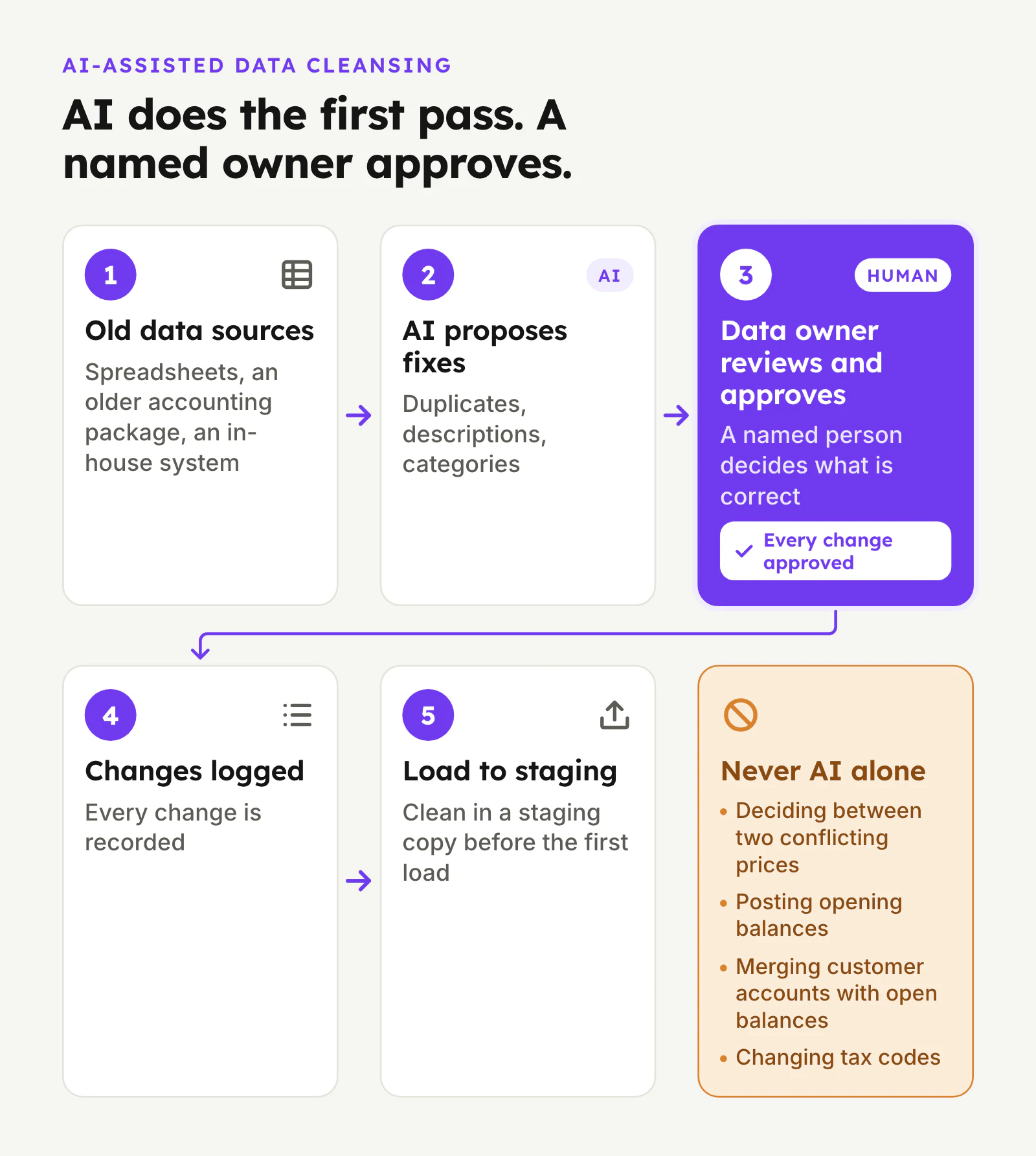
AI is useful in data migration, mostly as a fast, tireless first pass that people then check. Used that way, it shortens the dullest part of the project. Used as an unsupervised fixer, it creates errors that look tidy.
Reasonable uses:
- Duplicate detection. Finding likely duplicate items, customers or suppliers where names and descriptions differ ("ABC Engg Pte Ltd" vs "A.B.C. Engineering"). The model proposes groups; an owner confirms each merge.
- Normalising descriptions. Rewriting free-text item names into your agreed pattern and extracting attributes (size, material, pack size) into separate fields, with low-confidence lines flagged for review.
- Classifying. Suggesting categories for thousands of uncategorised items.
- Reading documents. Extracting price lists, contract terms or supplier catalogues that only exist as PDFs or scanned paper.
- Explaining exceptions. Summarising why a reconciliation does not tie (for example, which items carry a unit conversion mismatch) so the right person can fix it.
What AI should not do on its own: decide which of two conflicting prices is correct, post opening balances, merge customer accounts with open balances, or change tax codes. Those are business decisions with financial consequences. The pattern is the same one we use in live AI ERP workflows: the agent drafts, a named person approves, and every change is logged.
SectionRehearse the migration at least twice
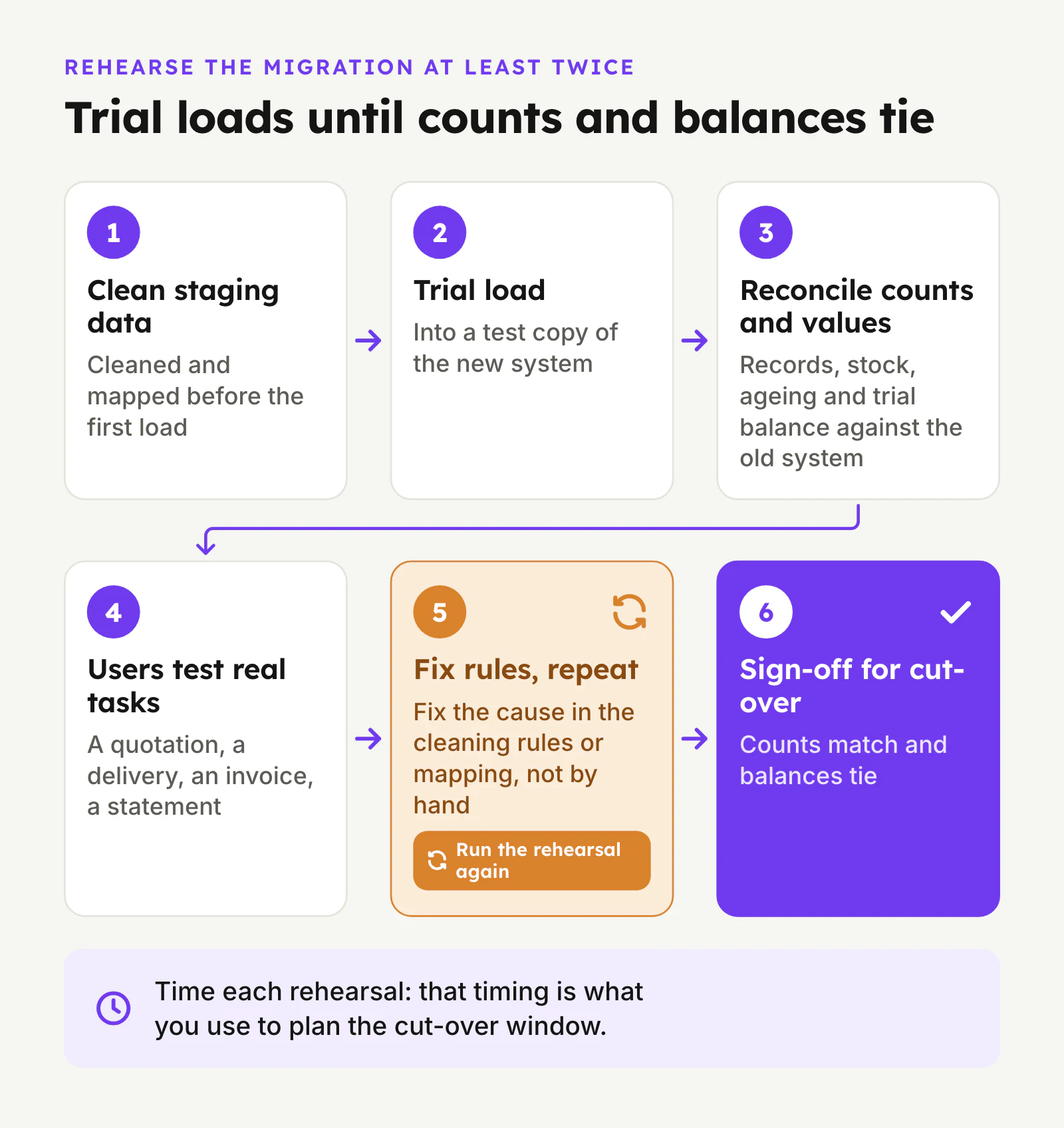
A migration you run once, on go-live weekend, is a migration you are testing in production. Plan rehearsals (trial loads) into a test copy of the new system.
What a rehearsal checks
- Every record loads, and rejected records are listed with reasons.
- Counts match: number of active items, customers, open orders, open invoices.
- Values reconcile: stock quantity and value by location, customer and supplier ageing, trial balance against the old system at the same date.
- Real users run real tasks on migrated data: raise a quotation for a regular customer, receive a delivery, issue an invoice, run a statement. Things that look right in a spreadsheet often break here.
- If the new system includes AI agents, run them against migrated data in a draft-only mode and look at what they get wrong. Bad agent drafts are a fast way to spot bad master data.
Fix the cause in the cleaning rules or mapping, not by hand-editing the test system, then run the rehearsal again. Time each rehearsal; that timing is what you use to plan the cut-over window.
SectionPlan the cut-over
Cut-over is the short window when you stop working in the old system and start in the new one. Choose a quiet period, often a month-end or a weekend after stocktake.
A typical sequence:
- Freeze master data changes in the old system a few days before.
- Final delta load of anything changed since the last rehearsal.
- Stock count or confirmation of stock on hand, then load opening stock.
- Open transactions with their current status.
- Balances as at the cut-over date, reconciled and signed off by finance.
- Go/no-go check against an agreed list: counts match, balances tie, key users have logged in and completed a test transaction.
- Read-only old system kept available for lookups and records.
Phased approaches reduce risk. You can move one entity, one warehouse or one module (for example sales and inventory before finance) at a time, or run the old and new systems in parallel for a short period on selected processes. Parallel running doubles workload, so keep it short and specific: compare outputs, then switch off.
SectionData readiness for AI ERP: the extra layer
If the goal is not just a new ERP but agents that move work forward, there is a little more to prepare:
- Approval roles and limits. Who approves quotations, purchase orders, discounts and invoice postings, and up to what value. Agents need these rules to route drafts to the right person.
- Matching keys. Customer part numbers, supplier codes, and aliases your team uses on the phone or in WhatsApp. These let an agent match a free-text request to the right item.
- Reference documents. Current price lists, terms, product specs and standard operating procedures, in a form the system can read.
- Exception history. Examples of past orders or invoices that needed correction. They become test cases for checking an agent before go-live.
None of this has to be perfect before you start. In practice the first agent workflow is usually narrow, for example one product line or one customer segment, and the data for that slice is cleaned properly first. Widening the scope later follows the same steps. This is also why wrapping an existing ERP can be a sensible first move: you clean only the data the first workflow needs, without migrating the whole business at once.
SectionCommon ERP data migration mistakes
- Migrating everything "just in case." It multiplies cleaning work and buries useful records under obsolete ones.
- Leaving cleaning until after go-live. Every new transaction then depends on the bad data.
- No business owner per data type. Technical staff end up deciding prices and account mappings.
- One rehearsal, or none. Load errors and reconciliation gaps appear on go-live weekend.
- Ignoring units of measure. Stock does not reconcile and nobody can say why.
- Letting AI fix data unsupervised. Tidy-looking but wrong merges and prices are harder to spot than obvious errors.
- Switching the old system off too early. You lose access to records you are required to keep and history staff still need.
SectionHow SleekDigital approaches data migration
On custom ERP and AI ERP projects, we treat data as its own workstream from the first week: map the sources, agree what moves and what is archived, clean in staging with named owners, use AI for first-pass deduplication and normalisation with human review, and rehearse loads before cut-over. Where an existing system such as SAP Business One or Xero stays in place, we connect to it through its APIs (see SAP Business One integration and accounting software integration) and prepare only the data the agents need.
If you are weighing whether to replace your current system at all, our build vs buy guide for custom ERP and AI ERP vs traditional ERP comparison are good next reads.
SectionFAQ: ERP data migration in Singapore
How long does ERP data migration take?
It depends mainly on how many sources you have and how clean they are, not on record counts. A business with one accounting package and a tidy item list moves far faster than one with item data spread across several spreadsheets and an old in-house system. Time your rehearsals; they are the most reliable estimate for your own project.
Can we migrate straight from Excel into an ERP?
Yes, many Singapore SMEs do. Excel is usually the main source for items, prices and customers. The work is in cleaning and standardising the sheets (one row per record, consistent codes, units and prices) and loading them through the ERP's import templates or API, not in the file format.
Should we migrate all our transaction history?
Usually not. Migrate open transactions and balances, plus the history people actively use, such as recent customer price history. Keep the rest accessible in a read-only archive so you meet record-keeping obligations without cluttering the new system.
How long do we need to keep the old data?
IRAS generally requires businesses to keep business records for five years. Other obligations may apply depending on your industry and contracts, so confirm the requirement with your accountant before decommissioning the old system.
Can AI clean our ERP data automatically?
AI can do a strong first pass: flag duplicates, standardise descriptions, extract attributes and read PDF price lists. It should propose changes, not apply them. A named owner approves merges, prices and financial mappings, and changes are logged.
Do we need perfect data before adding AI agents?
No. Start with one narrow workflow and clean the data that workflow depends on, such as one product range's items, prices and customer part numbers. Testing the agent in draft-only mode on that data will expose remaining gaps quickly.
What about personal data under the PDPA?
Customer and supplier contacts and employee records are personal data. Migrate only what you need, restrict access to staging files, and securely delete working copies after the migration.
Who should own the migration inside our company?
One business owner for the overall migration, plus a named owner for each data type (items, customers and prices, suppliers, finance). The implementation partner prepares and loads the data; your owners decide what is correct and sign it off.
SectionFinal take
Good data migration is mostly discipline: move less, clean before loading, give every data type an owner, rehearse until the numbers tie, and keep the old records accessible. AI makes the cleaning faster, as long as people still approve the decisions that matter. Get the data right, and both your staff and your agents start the new system with records they can trust.
Planning a new ERP or adding agents to the one you have? See how we build AI ERP for Singapore SMEs or book a free consultation.
Written by
Lester Law
Building custom software solutions for Singapore businesses. We help companies transform their operations with mobile apps, web platforms, and enterprise systems.