
SAP Business One Customisation in Singapore: Your 3 Real Options
If SAP Business One is your books but not your whole operation, you have three options. Configure more inside B1 (user-defined fields, formatted searches, approval procedures, partner add-ons). Build a custom app or AI layer outside B1 that reads and writes through the Service Layer or DI API, so B1 stays the system of record. Or replace B1, which is rarely the right first move.
For most Singapore SMEs we scope, the answer is a mix: keep B1 for finance and stock, configure what B1 does well, and build the outside layer for the people B1 was never designed for (sales staff on the road, customers, warehouse pickers, approvers on their phones).
Below: each option, the integration rules that keep your ledger safe, and where AI fits. If you already want the outside layer, see SAP Business One integration.
SectionWhere SAP Business One starts to pinch
B1 is a solid SME ERP. The limits show up at the edges, where people who are not B1 users do work that ends up in B1. The complaints we hear in scoping are consistent:
- Sales staff on the road cannot check stock or customer pricing without calling the office, and they do not have a full B1 seat.
- Customers want a portal to see their orders, invoices, statements and delivery status, instead of emailing your admin.
- Quotations are slow. An RFQ arrives as a PDF or WhatsApp photo, someone retypes 40 lines into B1, then checks prices one by one.
- Warehouse scanning is paper pick lists, then manual entry of what was picked and shipped.
- Approvals wait because the manager has to log into the B1 client to approve a purchase order or a discount.
- Documents pile up. Customer POs, supplier invoices and delivery orders arrive by email and someone keys each one in.
None of this means B1 is the wrong ERP. It means B1 is being asked to be a mobile app, portal and document reader too.
SectionOption 1: Customise inside SAP Business One
B1 has a lot of configuration room before you need external code, and your SAP partner can typically do this work. When the users already sit in B1 and the change is a field, a rule or a report, this is the cheapest and safest option.
What you can do inside B1
- User-defined fields (UDFs) and tables (UDTs): add fields such as project code, delivery zone, salesperson commission or certificate number to standard documents and master data.
- Formatted searches: auto-fill fields based on queries, for example pulling a customer's default delivery terms or the last price paid.
- Approval procedures: route sales quotations, orders or purchase orders for approval based on conditions like discount above a threshold or amount above a limit.
- Print layouts and reports: adjust quotation, invoice and delivery order layouts.
- Partner add-ons: buy an existing add-on for common needs such as warehouse management, e-commerce sync, payroll or industry-specific features.
Where it stops working
Inside-B1 changes assume the person works in the B1 client. They do not give a salesperson a phone screen, give a customer a login, or read a PDF purchase order. Heavy SDK add-ons can also make upgrades harder, since each must be retested on every new B1 version.
SectionOption 2: Build an outside layer on the Service Layer or DI API
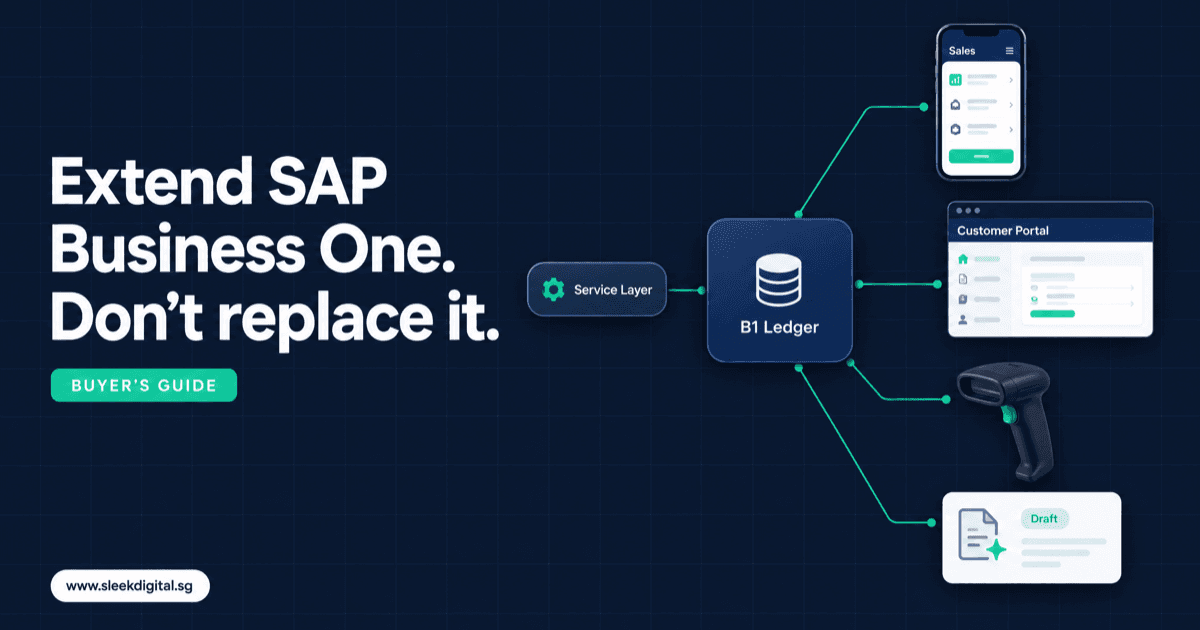
You keep B1 exactly where it is. A separate web app, mobile app or AI service sits beside it. It reads master data (items, customers, prices, stock) and writes documents back through SAP's documented interfaces:
- Service Layer: a web API (REST/OData style) that recent B1 versions provide. It is the usual choice for web and mobile apps. Documentation is on the SAP Help Portal.
- DI API: the older interface, typically used by on-premise applications and add-ons.
The outside layer can be:
- A SAP B1 mobile app for sales staff: stock, customer price, last orders, create a quotation draft on site.
- A SAP B1 customer portal: order history, open invoices, statements, reorder from past orders, delivery status.
- A warehouse scanning app: pick by barcode, confirm quantities, feed the delivery back to B1.
- A mobile approval app: approve or reject with the document summary on screen.
- An AI layer that reads documents and creates drafts in B1 for a person to check.
B1 stays the financial record and your SAP partner keeps supporting it. Staff who only need one narrow task get a simple screen instead of the full B1 client.
SectionOption 3: Replace SAP Business One
Consider replacement when B1 genuinely does not fit your core process (for example a manufacturing or project costing model you have bent B1 around for years), or when add-ons and workarounds make every upgrade a crisis. Replacing an ERP touches finance, stock, tax and every user. If the pain is at the edges (mobile, portal, documents, approvals), replacing the core to fix the edges is expensive and risky.
SectionComparison: customise, integrate or replace
| Customise inside B1 | Outside layer on Service Layer / DI API | Replace B1 | |
|---|---|---|---|
| Best for | Fields, rules, reports, desk users | Mobile, portal, scanning, approvals, AI drafting | Core process B1 cannot model |
| Who does it | Your SAP partner | Software developer, with your SAP partner | New ERP vendor or custom build |
| Users | B1 users in the B1 client | Sales staff, customers, warehouse, managers | Everyone |
| Risk to ledger | Low | Low, if writes go through documented APIs as drafts | High during migration |
| Upgrade impact | Low for UDFs, higher for heavy add-ons | Low, if the layer only uses documented APIs | Not applicable |
| Typical timeline | Days to weeks | Weeks to a few months per workflow | Many months |
| AI fit | Limited | Strong: read documents, draft into B1 | Possible, but bundled with a big migration |
SectionSAP B1 integration design principles
An outside layer is only safe if it follows a few rules. These are the rules we write into every SAP Business One integration scope.
B1 stays the system of record
Customers, items, prices, stock and financial documents live in B1. The outside app may cache data, but B1 wins every disagreement.
Write back through documented APIs only
All writes go through the Service Layer or DI API, never directly into B1 database tables. Direct writes bypass B1's business logic and break data in ways that surface weeks later at month-end.
Draft documents, not posted documents
The outside layer should create draft quotations, sales orders, purchase orders or AP invoices in B1. A person who already owns that step reviews and adds the document in B1. This is the single most important rule for AI-assisted work. It is the same approval pattern we describe in the human-in-the-loop AI approval checklist.
Idempotent sync
If the same customer PO is processed twice, it must update one draft, not create two sales orders. Every inbound document gets a unique reference, and the integration checks for it before creating anything in B1.
An error queue someone owns
B1 will reject some writes: a closed period, an inactive item, a credit limit. Failures go into a visible queue with the reason, and a named person clears it.
Field mapping, written down
Map every field between the outside app and B1: document series, warehouse codes, tax codes, UDFs, price lists, sales employee, payment terms. Most integration bugs are mapping bugs, not code bugs.
Licensing and your SAP partner
Some integration patterns need specific B1 user licences, and SAP's rules can change. Confirm licensing for your design with your SAP partner before you build.
SectionExtend SAP Business One with AI
AI works on top of B1 when it drafts and a person approves. The highest-value use cases are document-to-draft loops:
- RFQ to draft sales quotation: read the customer's RFQ (email, PDF, Excel, photo), match lines to B1 items and the customer's price, flag unmatched lines, create a draft quotation in B1. See quotation automation.
- Customer PO email to draft sales order: read the PO, match it to the quotation or price list, check stock, create a draft sales order. See sales order automation.
- Supplier invoice to draft AP invoice: read the invoice, match it to the PO and goods receipt, flag price or quantity differences, create a draft AP invoice for finance. See invoice processing automation.
- Stock and reorder suggestions: read B1 stock, open orders and sales history, then propose a reorder list. The buyer still creates the PO.
What the AI layer must not do: post documents, change prices, change supplier bank details, override credit holds, or email customers without approval. Distributors running high RFQ and PO volume are usually the best first fit, which is why wholesale distribution is where most of our B1 AI work starts.
For the wider pattern of putting AI around an ERP you already run, read how to add AI to an existing ERP. If you want AI across quoting, ordering, documents and stock as one operating layer, that is AI ERP.
SectionWorking with your existing SAP partner
You do not have to choose between your SAP partner and a software developer. The split that works:
- Your SAP partner keeps B1: licences, upgrades, configuration, UDFs, approval procedures, reports and B1 support.
- We build the outside layer: the mobile app, portal, scanning app or AI drafting service, connected through the Service Layer or DI API.
Agree early who owns the field mapping, who creates any UDFs the integration needs, and who is called first when a write fails.
SectionWhat it costs
These are scoping ranges, not quotes:
- A focused workflow module (for example one AI drafting loop or a mobile approval app on B1) typically starts from about S$10,000.
- Custom software projects, such as a customer portal plus a sales app on B1, mostly fall between S$30,000 and S$250,000+, depending on scope and the number of B1 objects involved.
- AI development work typically runs S$30,000 to S$150,000+, and a first AI agent is typically live in 8 to 12 weeks.
- A full AI ERP layer runs S$50,000 to S$300,000+.
Qualifying SME projects may be up to 50% claimable under the Enterprise Development Grant (EDG), with eligibility decided by Enterprise Singapore. Inside-B1 configuration by your SAP partner is priced separately by them.
SectionChecklist before you start
Copy this into your planning document:
- Name the one workflow that hurts most (quotation, order entry, AP invoice, approvals, scanning, portal).
- Confirm your B1 version and whether it is on HANA or SQL Server, and whether the Service Layer is available.
- Ask your SAP partner what licences the integration design needs.
- List the B1 objects involved (items, business partners, price lists, warehouses, document types).
- Clean the master data that matters: item codes, customer codes, price lists, units of measure.
- Decide which documents are created as drafts and who approves each one.
- Name the owner of the error queue and a deputy.
- Collect 20 to 30 real sample documents (RFQs, POs, invoices) for testing.
- Decide what data may go to an AI model, and check it against your PDPA obligations.
SectionWhen to stay inside SAP Business One
Do not build an outside layer if:
- The users are already B1 users at a desk, and the change is a field, a rule or a report.
- A supported partner add-on already does exactly what you need.
- Your volume is low. Ten POs a month do not need an AI reader.
- Your master data is a mess. Fix item codes and price lists first, or any app will just reproduce the mess faster.
- Nobody will own the approval step. An AI draft that nobody reviews is a liability, not a saving.
Start with the cheapest change that removes the pain. Build outside B1 only when the people doing the work are not B1 users, or the work starts in documents B1 cannot read.
SectionFAQ
Can SAP Business One be customised without breaking upgrades?
Yes, if you keep changes to supported mechanisms. UDFs, formatted searches, approval procedures and outside apps that use the Service Layer or DI API are generally upgrade-friendly. Direct database changes and heavy unsupported modifications are what cause upgrade pain.
What is the SAP B1 Service Layer?
It is a web API that recent SAP Business One versions provide for reading and writing B1 data, such as business partners, items and sales documents. Web apps, mobile apps and AI services typically use it to integrate with B1. Check SAP's documentation and your SAP partner for what your version supports.
Can AI post invoices or orders directly into SAP B1?
It can technically, but we do not recommend it. AI should create drafts in B1 that a named person reviews and adds. That keeps the ledger under human control.
Do our sales staff or customers need SAP B1 licences to use a portal or app?
It depends on the integration design and SAP's licensing rules, which can change. Confirm this with your SAP partner during scoping, before you commit to a design.
How long does a SAP B1 add-on or integration take?
A single focused workflow, such as an approval app, typically takes weeks rather than months. A first AI agent is typically live in 8 to 12 weeks. A portal plus sales app takes longer.
Next step: If you want a written scope and quotation for an app or AI layer on SAP Business One, talk to us. Bring one sample document pack and your B1 version. You can also see how we approach SAP Business One integration for Singapore companies.
Written by
Lester Law
Building custom software solutions for Singapore businesses. We help companies transform their operations with mobile apps, web platforms, and enterprise systems.